Turn Instagram Comments Into Followers with Lnkk.it Auto-DM

Getting comments on your Instagram posts is great—but what happens after someone comments?
For many creators, the process ends there. They manually reply to comments, send DMs, share links, and hope the person follows their account.
Lnkk Auto-DM changes that workflow.
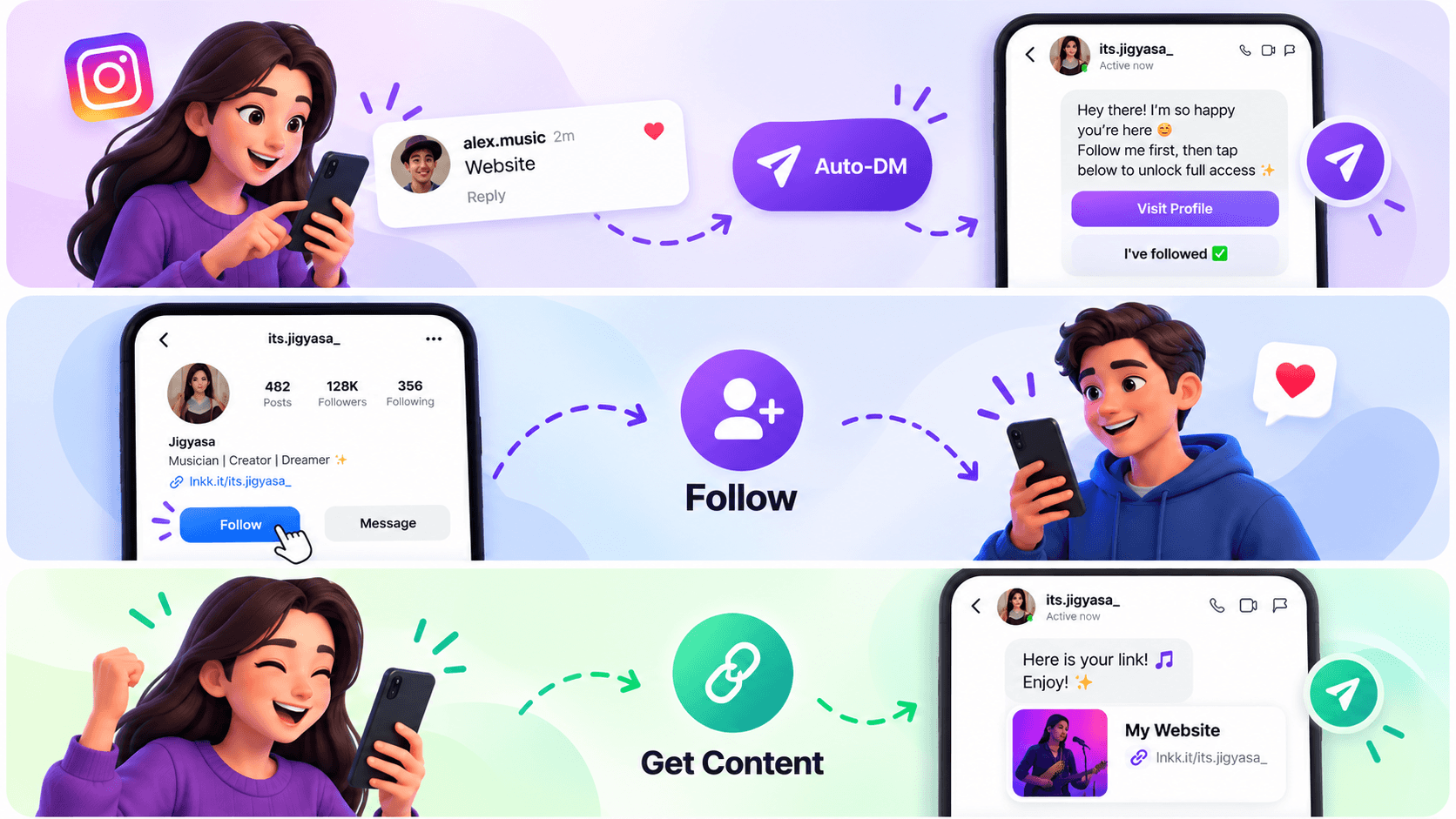
With the follow feature in Lnkk.it Auto-DM, creators can build an automated journey where a person comments on an Instagram post or Reel, receives a DM, is asked to follow the account, and then gets access to the promised content or link.
Instead of treating comments as simple interactions, you can turn them into a structured comment → follow → DM → content journey.
What Is Instagram Comment-to-DM Automation?
Instagram comment-to-DM automation allows creators to automatically respond when someone comments on a post or Reel.
For example, you could publish a post saying:
"Want the free guide? Comment GUIDE below."
Someone comments GUIDE.
Instead of manually opening Instagram and sending them the guide, Lnkk.it can automatically start the configured DM flow.
You can then ask the person to follow your Instagram account before continuing.
This makes your comment section more than just a place for engagement—it becomes an entry point into your follower-growth workflow.
How Lnkk Turns Comments Into Followers
The process is simple:
1. Choose Your Instagram Post or Reel
Start by selecting the Instagram post or Reel where you want to activate your automation.
You can create an automation around a specific piece of content or configure the appropriate comment trigger.
2. Set Your Trigger Keyword
Choose the word or words that should trigger the automation.
For example:
GUIDE
LINK
PRICE
COURSE
FREE
INFO
If someone comments with the configured keyword, Lnkk.it can trigger the next step in the automation.
3. Automatically Send a DM
Once the comment matches your automation, the user receives a DM.
For example:
"Hey there! I'm so happy you're here 😊
Follow me first, then tap below to unlock full access."
The message can include buttons that guide the user through the next step.
4. Ask the User to Follow
This is where the Follow feature comes in.
The user can see options such as:
Visit Profile
and
I've followed ✅
They can visit the creator's Instagram profile, follow the account, and then return to the conversation.
5. Check the Follow Step
After the user taps I've followed, the automation can check the follow step.
If the person hasn't followed yet, they can receive a follow-up message asking them to complete the step.
For example:
"Oops! You haven't followed yet 👀
Tap below to follow 😊"
This creates a clear path instead of immediately giving away the requested content.
6. Deliver the Link or Content
Once the follow step is completed, the automation can continue with the next part of your flow.
For example:
"Here is your link!"
This can be used for resources, landing pages, products, guides, offers, and other destinations you want to share.
Comment → Follow → Content
The entire journey can be represented simply:
Instagram Post/Reel
↓
User Comments
↓
Lnkk Auto-DM
↓
Follow Request
↓
Follow Check
↓
Content / Link Delivered
This removes several manual steps from the creator's workflow.
Why Use a Follow Gate in Instagram Auto-DM?
When someone comments on your content, they have already shown some level of interest.
Instead of immediately sending the requested resource, creators can configure their automation to include a follow step.
This can be particularly useful for:
Free Guides
Promote a free PDF, checklist, template, or resource.
"Comment GUIDE and I'll send it to you."
The automation can then guide the commenter through the follow step before delivering the resource.
Courses
Promote a course or educational resource.
"Comment COURSE for the details."
The user enters the automated DM flow and can be guided toward your profile and course.
Digital Products
Use comments to start conversations around ebooks, templates, presets, or other digital products.
Exclusive Content
Creators can use the workflow when promoting content that they want to share with an engaged Instagram audience.
Creator Offers
Coaches, influencers, educators, musicians, and businesses can use comment-triggered automations to guide interested users toward their next action.
No More Manually Checking Every Comment
Imagine receiving hundreds of comments on a Reel.
Without automation, you may need to:
Find the comment.
Reply manually.
Open the person's profile.
Send a DM.
Ask them to follow.
Check whether they followed.
Send the promised link.
That process quickly becomes difficult to manage.
With Lnkk.it Auto-DM, the workflow can be configured in advance.
Once the automation is active, the system handles the configured steps automatically.
Build Your Automation in 3 Steps
Lnkk.it keeps the automation setup straightforward.
Step 1: Trigger
Choose when the automation should start.
For example:
Someone comments on a specific post or Reel.
You can also configure specific keywords.
Step 2: Message
Create the messages your audience receives.
You can configure:
Comment reply
Opening DM
Follow request
Follow-check message
Button text
Final content/link message
You can also preview the DM experience before launching the automation.
Step 3: Settings
Configure the automation settings and launch it.
Once active, your Instagram content can start sending commenters through your predefined journey.
Example: Turn a Freebie Post Into a Follower Funnel
Let's say you're a fitness creator.
You publish:
"Want my 7-day workout plan? Comment WORKOUT and I'll DM it to you."
A viewer comments:
WORKOUT
Lnkk.it detects the keyword.
The viewer receives:
"Follow me first, then tap below to unlock the workout plan."
They tap Visit Profile, follow your account, and return to the DM.
They tap:
I've followed ✅
The follow step is checked.
The automation then continues and sends the workout-plan link.
Your workflow:
Reel → WORKOUT comment → Auto-DM → Follow → Follow Check → Workout Plan
That's the power of combining Instagram comment automation with a follow step.
Who Can Use Lnkk.it Auto-DM?
The feature can be useful for many types of Instagram creators and businesses.
Creators
Turn content engagement into a structured follower-growth workflow.
Coaches
Use comments to distribute resources, book calls, or promote coaching.
Educators
Send guides, lessons, resources, and course information automatically.
Influencers
Use keyword-based comment campaigns to guide followers toward content and offers.
Musicians
Promote new releases, music links, tickets, and other content through automated conversations.
Businesses
Use Instagram comments as an entry point for offers, resources, campaigns, and lead-generation flows.
Turn Your Instagram Comments Into Action
Your Instagram comments already represent people interacting with your content.
The next step is creating a system that guides those interactions somewhere useful.
With Lnkk.it Auto-DM, you can create a workflow that connects:
Comment → DM → Follow → Follow Check → Content
Instead of manually managing every response, configure the journey once and let the automation handle the repetitive steps.
Start Turning Comments Into Followers
If you're using Instagram to grow an audience, promote content, sell products, or generate leads, your comments can become part of a much bigger workflow.
Create your Instagram Auto-DM automation with Lnkk.it and turn comment interactions into opportunities for follower growth.
Try Lnkk.it today.
FAQ
What is Instagram comment-to-DM automation?
Instagram comment-to-DM automation automatically starts a DM conversation when someone comments on a configured Instagram post or Reel. With Lnkk.it, creators can add additional steps such as a follow request and follow check.
How can I turn Instagram comments into followers?
You can create an automated comment-to-DM workflow that asks commenters to follow your Instagram account before providing the requested content or link. Lnkk.it provides a follow-focused step within its Auto-DM workflow.
Can I ask Instagram users to follow before sending a link?
Yes. Lnkk.it's Auto-DM follow feature allows you to configure a message asking users to follow your account, provide a Visit Profile button, and then use an I've followed step before continuing the automation.
What can I use Instagram Auto-DM for?
You can use comment-triggered automations for free guides, digital products, courses, resources, offers, links, campaigns, and other content you want to distribute through Instagram conversations.
Do I have to manually reply to every Instagram comment?
With a configured Lnkk.it Auto-DM automation, you don't have to manually handle each qualifying comment. The automation can trigger the configured reply and DM workflow automatically.
What is a follow gate?
A follow gate is a step in an automated journey where the user is asked to follow an Instagram account before continuing to the next step of the flow.